Overview
- The BPAY File Import records customer BPAY payments (and any refunds/reversals) against jobs automatically, using the settlement file provided by your bank.
- Each transaction in the file carries the Customer Reference Number (CRN) printed on the customer’s invoice. Dataforce uses the CRN to find the matching job, so no spreadsheet preparation is needed - the bank file is uploaded as-is.
- Two file formats are supported and detected automatically:
| Format | Comes from | File type |
|---|---|---|
| CommBank BPoint settlement file (BAI2) | BPoint back office / CommBank daily delivery | .csv |
| Standard BPAY Biller Remittance File (BRF) | Your bank’s BPAY biller reporting (fixed-width file) | .txt, .brf, .dat |
Requirements
Importing a BPAY file
-
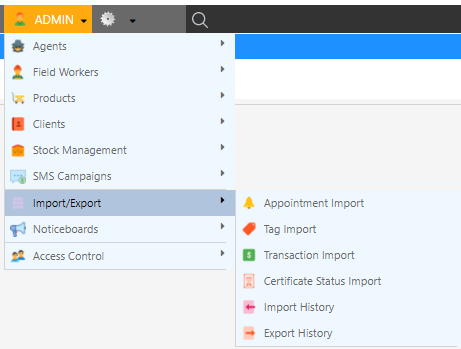
Open the Transaction Import menu by clicking Admin Import/Export Transaction Import
-
In the Import from dropdown, select BPAY / BPoint Settlement File

-
Click Choose a file… and select the settlement file exactly as it was downloaded from your bank - do not open and re-save it in Excel, as this can alter the file contents

-
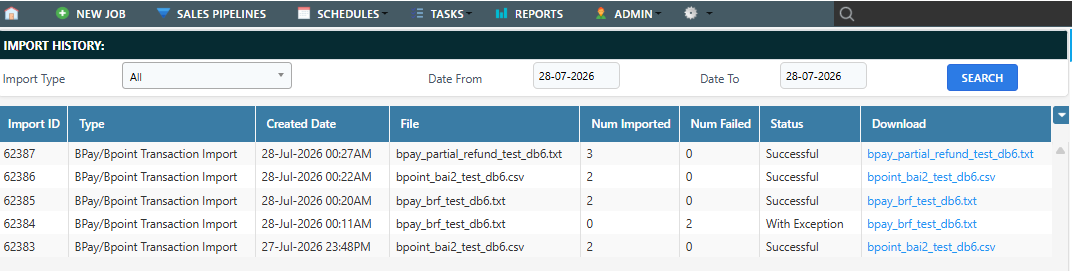
Click Upload Transaction File. Once the file is processed you will be redirected to Import History showing how many transactions succeeded and how many failed. BPAY imports appear under the BPay/BPoint Transaction Import filter
What gets recorded
- Payments are added to the job identified by the CRN as a payment credit, with the bank’s transaction reference and payment date. The job’s balance and invoice eligibility are updated automatically.
- Error corrections and reversals are recorded as refunds against the original payment. Partial refunds are supported - the refund is matched to the original transaction and cannot exceed the amount still refundable on it.
- Payments already recorded in Dataforce - for example a card payment taken through the BPoint gateway, or a row from a previously imported file - are recognised by their reference numbers and are not duplicated. These rows are reported as errors so you can see they were skipped.
Validation and safety checks
The whole file is checked before anything is recorded. The import is rejected outright when:
- the file’s internal control totals or record counts do not balance (a sign of a truncated or edited file),
- the same file has already been imported (matched on file content and the file’s creation date/time),
- the biller code or merchant number in the file does not match your configuration.
Individual transactions are then processed one at a time. A problem row (for example, a CRN that does not match any job) is logged as an import exception and skipped - it never rolls back the rows that succeeded.
Viewing errors
- Click the import ID in the Import History menu. Errors are displayed at the bottom of the page with the line number in the bank file and a description of the problem.
Common error messages
| Message | Meaning | What to do |
|---|---|---|
| Duplicate file detected | This settlement file was imported previously | Nothing - the transactions are already recorded |
| Unrecognised file format | The file is not a BPoint BAI2 or standard BRF file | Re-download the original file from the bank; do not re-save it in Excel |
| …does not balance… | The file’s control totals don’t match its transactions | The file is corrupt or was edited - request a fresh copy from the bank |
| Unknown biller code / merchant id | The file belongs to a different biller | Check the right file was uploaded, or ask Dataforce support to update your biller configuration |
| CRN … is not for this program / invalid check digit | The customer paid with a reference that isn’t from this database | Investigate the payment manually and record it via Transaction Import if needed |
| Transaction reference … already exists | The payment was already recorded (e.g. taken live via BPoint) | Nothing - this prevents double-ups |
| Original payment not found for refund | A refund in the file couldn’t be matched to a payment on the job | Locate the original payment and process the refund manually on the job |