A guide to editing customer details
Our Customer Details screen is found within a Customer and is used to updated fields collected during customer creation.
To edit customers details:
- Search for a customer.

- Or Open from existing Job or Appointment
- In the side bar navigation click Customer Customer Details.

- Open the first tab Titled Customer Details and completed basic details section.

- Complete the Property Address section, and the Owner Details and Billing address options if they apply (see below).

- Click Update Customer.

To review Prior Changes
Owner details and billing address
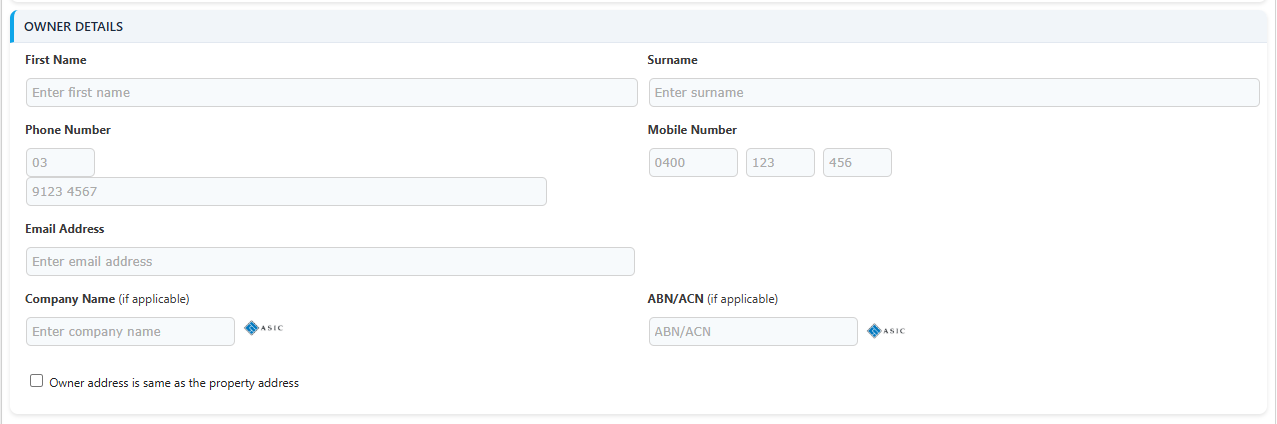
When the property owner is not the customer (for example a landlord or a managing agent), tick “Owner is different to the customer above” under Provide owner details. An Owner Details card appears where you can record:
- the owner’s first name, surname, phone, mobile and email
- their company name and ABN/ACN - the ASIC lookup icons beside each field verify them against the register
- the owner’s address, using the same address search and validation as the property address - or tick “Owner address is same as the property address” to skip it
The Billing address can be set to Same as property, Same as owner or Different address. Choosing Different address reveals a separate billing address section.
Note: The owner details and billing address options only appear when they are enabled for your program in Program Preferences. Untick the owner box to clear the owner details.