Overview
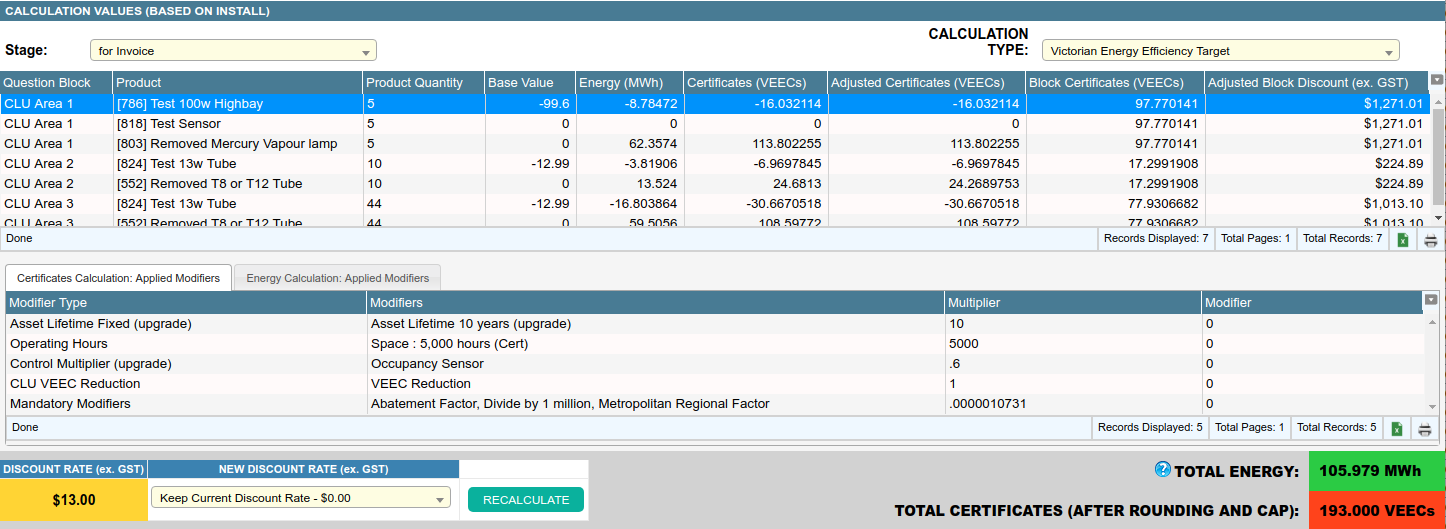
The Job Calculations tab displays the details of all calculations performed for each appointment in the job and allows the operator to:
- Force the calculations to be recalculated
- Modify the discount rate for each calculation type
- View calculation details and breakdowns
- Change calculation caps for the job
Calculations are calculated individually for each appointment in the job. Use the “Show calculations for” dropdown to choose which appointment’s calculations to display.
Toggle Between Quote/Invoice Calculation

- Move the mouse to the top left of this tab.
- Click the dropdown titled Show Calculations For.
- Select the required stage and the tab will switch.
Toggle Between Different Calculations

- Move the mouse to the top right of this tab.
- Click the dropdown titled Calculation Type.
- Select the required calculation and the tab will switch.
Viewing Calculation Breakdowns
Calculation breakdowns is an in depth process. Please refer to our documentation page on this topic.
Force a Recalculation Run

- Make sure the correct appointment is selected
- Click the button titled Recalculate to recalculate the calculation
Clicking Recalculate will process all calculation types for the selected appointment only
Change the Discount Rate

- From the Show Calculations for dropdown, pick the appointment you wish to to change the discount rate for.
- Click the dropdown under the New Discount Rate heading and selected the desired discount rate
- If you want a custom discount rate, select the Enter New Discount Rate option.
- Enter a new discount rate into the text field which appears to the right, e.g. 100.00 for one hundred discount per certificate. Values are exclusive of GST.
- Click the button titled Recalculate to recalculate using the new discount rate.
A calculation cap can also be entered to cap the number of certificates generated.
| Field | Description |
|---|---|
| Question Block | If a product is linked from a question block then its name will be listed here. |
| Product | The product’s name which is prefixed by its database ID. |
| Product Qty | The quantity of products used in the calculation. |
| Base Value | A starting value for the calculation based on product settings. |
| Primary Calculation Result | The result from the primary calculation; the column heading comes from the calculation type configuration. |
| Secondary Calculation Result | The result from the secondary calculation; the column heading comes from the calculation type configuration. |
| Primary Adjusted Calculation Result | The result from the primary calculation after adjustments e.g. rounding rules. The column names comes from the calculation type configuration. |
| Primary Calculation Area Subtotal | The subtotal of the primary calculation for the question block area; e.g. if the area has 2 products, this column is the subtotal for those products. |
| Discount for Area | Discount for the area using the adjusted primary calculation results. |